Label Tasks Panel
Once entered in the project, the label tasks panel appears with four sections. When your project is first created, numerical fields such as species counts (e.g. sockeye, video duration, random number etc.) will be displayed as strings. By clicking on the column header the user can convert these to filterable numerical (num) values. Once a field has been changed to a numerical value it will remain numeric, so this is a one-time action required at the start of your project.
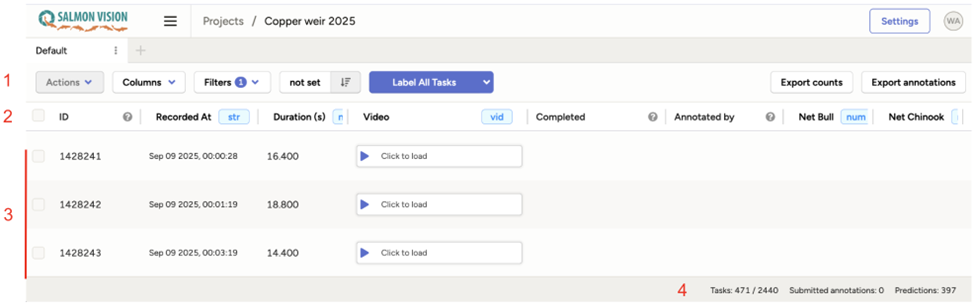
Section 1: User Selected Settings
a) Columns
You can choose which columns to include in the panel. The default should be sufficient for most cases but many more options are available.
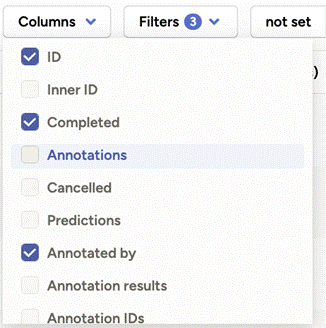
Here the columns ID, Completed, Annotated by, etc. have been selected and are visible in the interface. These variables can be used to sort or make selections of the data using filters (see next section). Note that the columns showing the total recorded for the different classes continue further right past the Chinook.
b) Filters
Filters can be used to subset the data based on user-defined criteria. In the example below the data to be included are filtered so that:
- Only videos from September 2025 are considered
- 0.33 of all videos are randomly selected (~1/3) using a built-in Random number function
- Only videos with Sockeye >= 1 are considered
- The fourth filter shows what other filters are available
Filters can be very useful if one wants to target specific events, species or date ranges.
Important — If filtering for date ranges use the Video recorded at (UTC, sortable) field. The Recorded At field will produce errors because of Label Studio’s inability to filter data fields with spaces included.
c) Sorting
The not set option provides the opportunity to sort the rows by a user-defined column.
d) Label All Tasks
Label All Tasks allows the user to go through a different panel and start sequentially reviewing the videos assigned to them.
Section 2: Column Headers
The names of the columns which were selected in the Columns option (Section 1). The ID column is a unique identifier set by Label Studio.
Section 3: Individual Video Clips
The individual video clips with their unique ID, time of recording and duration.
Section 4: Summary Statistics
Shows the number of files queried relative to all files. In this case 471 videos of the 2440 in total. When starting reviewing the selected tasks, Submitted annotations provides a counter for your progress (in this case 0 tasks have been annotated). Predictions provides the total number of videos that contain detections in the selection of the dataset (or entire dataset if no filters are applied).