Annotation vs Reviewing
Terminology
Before describing the workflow, a few terms used throughout which are important to understand:
- Bounding box - the rectangular shape drawn around a fish in a video frame.
- Annotation - a complete unit consisting of a bounding box, its class assignment (e.g. salmon species), and its track ID across frames.
- Label - the class assignment of an annotation.
- Annotator - the person working with the video. Depending on the project, an annotator may be either annotating (producing new high-quality data from scratch) or reviewing (checking and correcting AI-generated annotations). The two workflows are described below.
- Detection -
- Amodal tracking -
- Predicted -
Bounding Box
Drawing rectangular bounding boxes around objects is required for the initial model training stage, as the model needs to learn what to detect. Imagery that has gone through our computer-vision algorithm produces bounding boxes showing which objects the model detected. These bounding boxes, provided they are of high quality, can subsequently be used to retrain the model and improve performance. High-quality bounding boxes have the following characteristics:
- Tight fitting - the bounding box should capture the fish tightly around the body.
- Fish coverage - capture the entire fish, even if it is partly covered by another fish or object. This is also known as ‘amodal’ labelling*.
- No rotation - the bounding box is a rectangle with horizontal and vertical lines, keeping its sides parallel to the image edges. The default orientation when drawing the box is correct.
Annotation vs Reviewing
The description above captures a high quality label which can be used for retraining the models. However, it is also time consuming. Therefore we make a distinction between two different video workflows depending on the project goals; annotation and reviewing.
Annotation
For each video, the reviewer will start with an unlabeled video. If you have bounding boxes generated by AI, delete them first. The goal is to produce high quality annotations which can be used for model training adhering to the following criteria:
- Draw tight fitting bounding boxes capturing the entire fish.
- Fish is tracked properly from emerging to disappearing. Only skip frames in which the fish is not visible (but keep the same track ID).
- Label all the fish.
This is high quality data that will be used as new training data.
Reviewing
Reviewing is a much faster process in which the annotator checks the class assignment, confirms that bounding boxes loosely fit each fish, and verifies that all fish are captured moving in the correct direction. The goal of a review is to produce a correct count, with less emphasis on the precise location and size of bounding boxes. When reviewing, annotators should watch for these three common AI-generated errors:
- Erroneous bounding boxes
- Missed detections (fish that pass through the video box without being detected)
- Inaccurate count of species that cross the midline (refer to “Reviewing Counts” below)
If an AI annotation is significantly inaccurate, there are two main options:
- Adjust the existing bounding box (only efficient if necessary for a couple keyframes)
- Delete the bounding box and redraw it manually
- Redraw bounding box for missed fish
The difference between annotation-grade and review-grade data is not always clear-cut — AI-generated data in a reviewing session can occasionally reach annotation-grade quality. To safeguard the high quality of our training dataset, we require all annotations in an annotation-grade dataset to have manually drawn bounding boxes.
Reviewing Counts
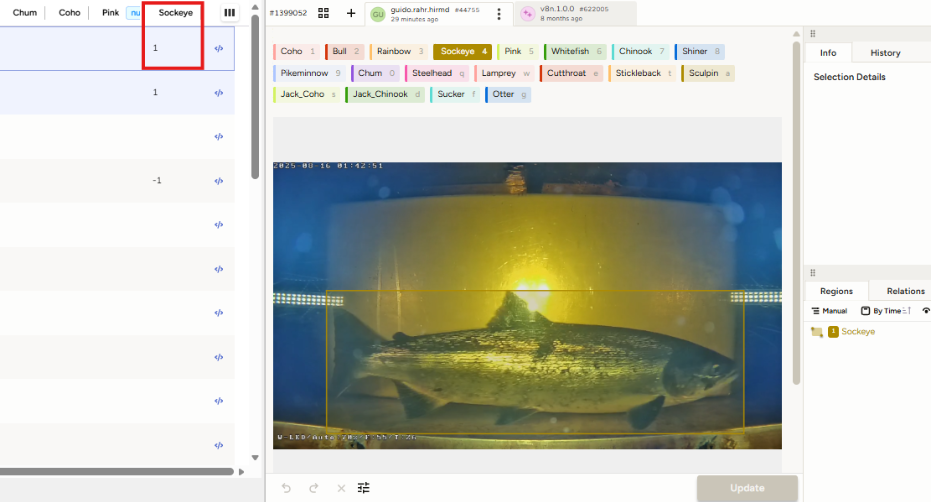
Each video containing an annotation that crosses the midline will produce a count for the species assigned to the bounding box. Crossing the midline in an upstream direction will produce a positive count, and crossing the midline in a downstream direction will produce a negative count. The sum of these directional crossings will produce a net count for each video. When reviewing, it is important to confirm the count displayed under Panel 1 in the Label Review Interface after the video has been submitted. Some AI-generated detections can be difficult to notice, as erroneous bounding boxes can be small or hidden among other detections and easy to miss.
Example of Labelling
Good: Bounding boxes neatly placed covering the entire fish and parallel to the image sides.
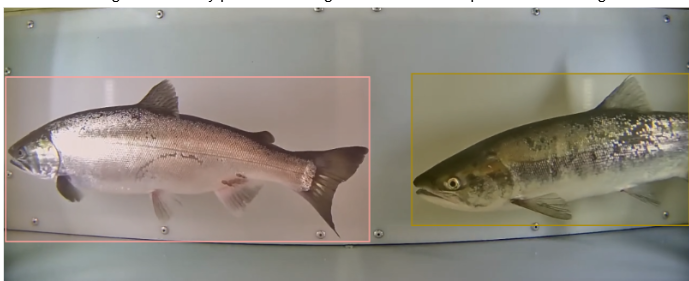
Bad: Bounding box not covering the entire fish, there is too much space between fish and bounding box and one bounding box is rotated.
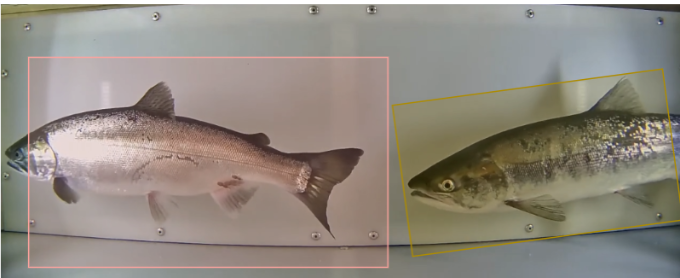
Good amodal tracking example
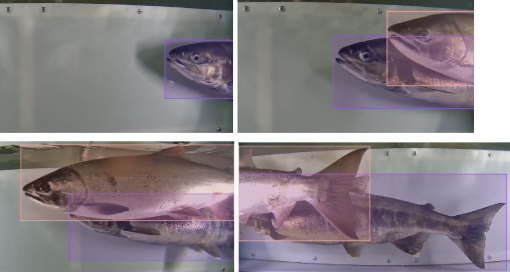
Good use of bounding boxes
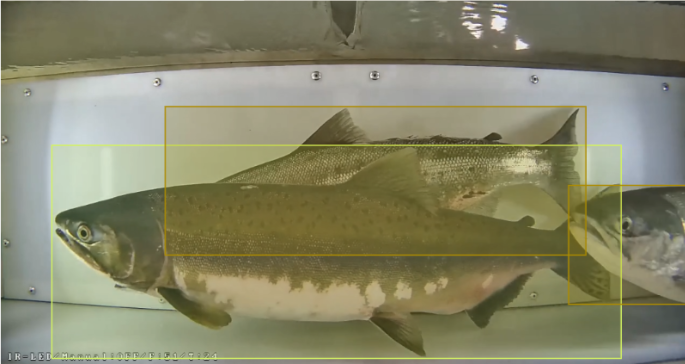
Bad: Inaccurate use of bounding boxes as fish in the front and back are not fully captured by the bounding box. Only the fish (head) on the right is properly labelled.
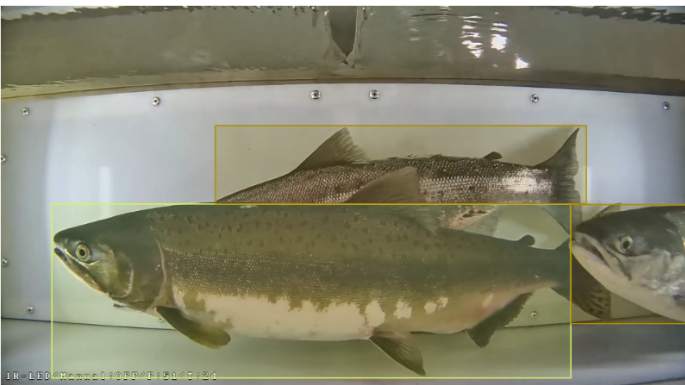
*Note that truly amodal annotations also include bounding boxes where the object of interest is completely occluded. We don’t do this here.